A repository-wide coding task can use much more of an AI plan than a quick code question. Prompt count alone does not explain the difference. The model, the context carried through a session, the tools it calls, and the account being billed all affect what you see on the usage meter.
Check the account and billing path first. Then look at what changed in the work session that used more capacity than usual.
Make sure you’re looking at the right account and meter
Open the provider’s usage page and confirm the signed-in account and workspace match the coding tool. A browser tab can be logged into a personal account while your IDE or terminal uses a company account.
Also check whether you’re using a subscription allowance or API billing. In Claude Code, an ANTHROPIC_API_KEY environment variable can make the CLI use API billing instead of your Claude subscription. In Cursor, requests made with your own API key on an individual plan are billed by the model provider rather than deducted from Cursor’s included usage pools. Those charges may not appear where you expect in the subscription meter.
If you need a refresher on the provider screens, see the guides for Claude Code usage, Codex usage, and Cursor usage.
Common reasons usage drops quickly
The session is carrying a lot of old context
In a long coding conversation, the agent may keep using earlier messages, project instructions, files it read, and tool results. A debugging session that has scanned many files and produced several diffs can become more expensive to continue than a fresh, focused task.
Start a new session when you switch to an unrelated job. In Claude Code, /clear starts fresh while keeping project instructions, and /compact summarizes an ongoing session when you still need its history. A new chat does not reset your subscription allowance; it reduces how much old context is carried into the next work.
The agent is doing more work than the prompt suggests
“Fix the bug” can lead to file searches, edits, test runs, retries, and follow-up inspections. A task across a large repository may take many more steps than a small, contained change. Codex usage varies with the task, model, context, reasoning, tools, and where it runs. Claude usage also varies with conversation length, features, model, and effort; Cursor’s selected model affects how quickly included usage is consumed.
Make the target smaller: point to the relevant files, ask for a plan before a broad refactor, and have the agent report a checkpoint before running another round of tests. This gives you a chance to stop an unnecessary loop.
The model or effort setting changed
Some models and higher reasoning or effort settings use more allowance per task. Cursor also separates usage pools, and its model selection affects how quickly included usage is consumed. If usage changed after you switched models or enabled a more intensive mode, compare those settings before assuming something is wrong with the meter.
Another app is using the same allowance
Claude subscription usage is shared across Claude.ai, Claude Code, and Claude Desktop. A coding session may start with less capacity because you used Claude elsewhere earlier in the same period. Some ChatGPT plans also share Codex allowances with other supported agent features. Check the provider’s plan details for your account rather than treating each app as a separate quota.
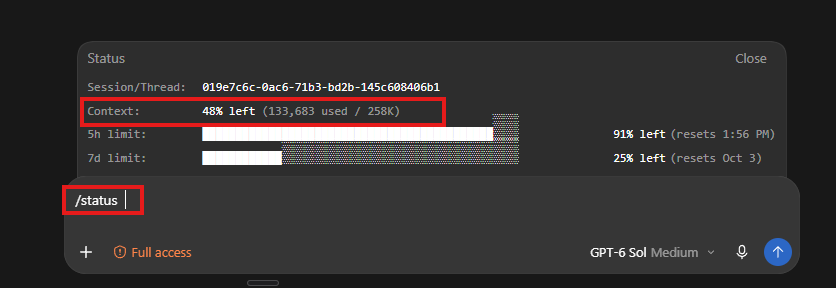
A quick way to find the cause
For your next few work sessions, note four things: provider and account, selected model or effort, task type, and the usage meter before and after. Check the provider page again if its number does not update immediately.
Change one thing at a time. For example, compare two similar tasks with a fresh session versus a long-running one, or use a lighter model for routine edits. If the meter still drops unexpectedly, check whether the tool is using an API key or another account. Avoid comparing percentages across providers; each meter tracks a different allowance.
Reduce avoidable usage
- Start a new chat or CLI session when you move to a different task.
- Reference the relevant file paths instead of pasting large files or full build logs.
- Ask the agent to inspect a defined area before it scans the whole repository.
- Use a model and effort setting that fits the job; save more intensive reasoning for difficult work.
- Turn off tools or connectors that the current task does not need.
- Set a warning threshold so you can check the account before a long run.
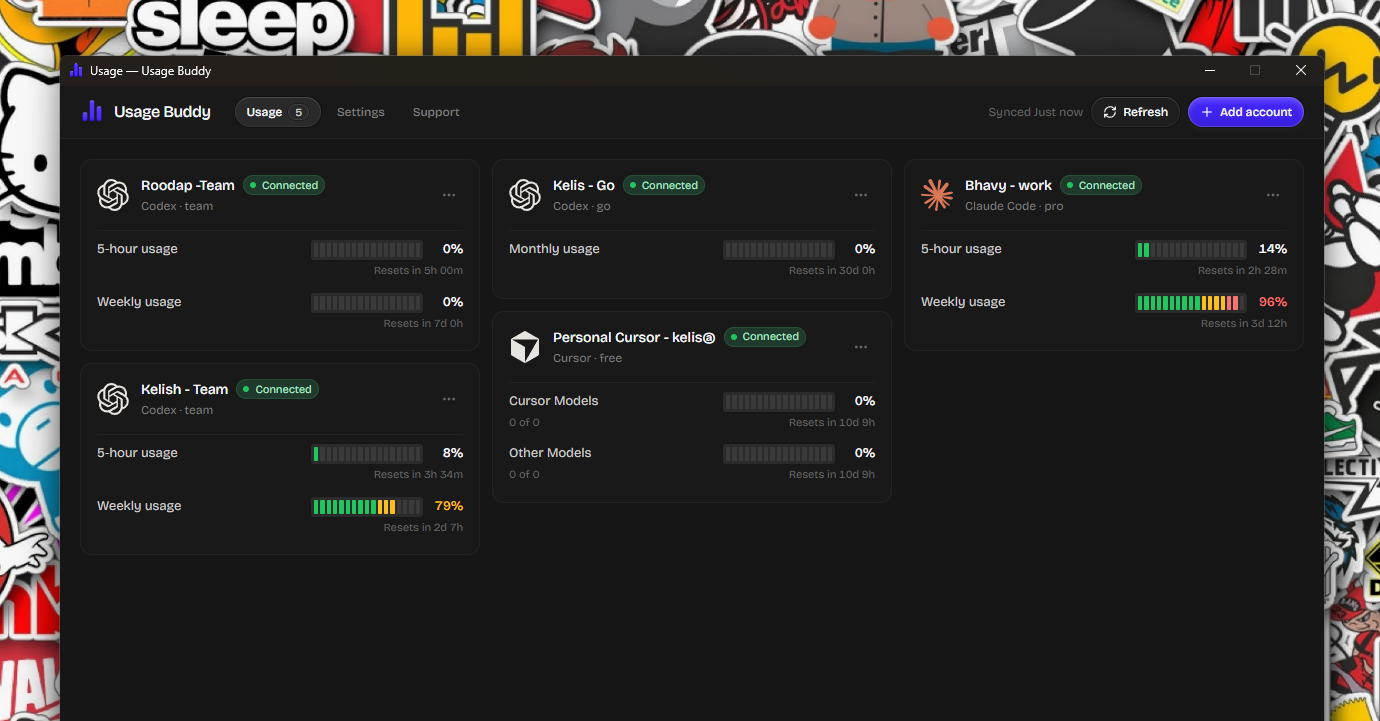
Monitor usage across accounts with Usage Buddy
If you use several Codex, Claude Code, or Cursor accounts, Usage Buddy shows their remaining allowances and reset times together on Windows or Mac. Threshold alerts can flag an account that is getting low before you start a long coding task. It does not analyze per-project token use or change provider limits; the provider’s own dashboard remains the place to verify billing.
Usage Buddy is available with a one-time $4.99 lifetime license. If you regularly switch between personal, team, and client accounts, one overview can help you choose an account with enough room without checking each provider page one by one.