If you use Claude Code with more than one Claude account, check which account is active before starting a coding session. The account determines which plan or API billing is used. In Claude Code, /status shows the active account, and /login or /logout lets you switch. Use /usage to check that account's plan limits and current rate-limit status. The Claude Code usage guide explains the web and CLI meters in more detail.
This setup is useful when you keep personal and work access separate, use an approved client account, or belong to both an individual and a Team or Enterprise organization.
Switch Claude accounts in Claude Code
Start Claude Code in your terminal and use these commands:
- Type
/statusto see the account currently connected to the session. - Type
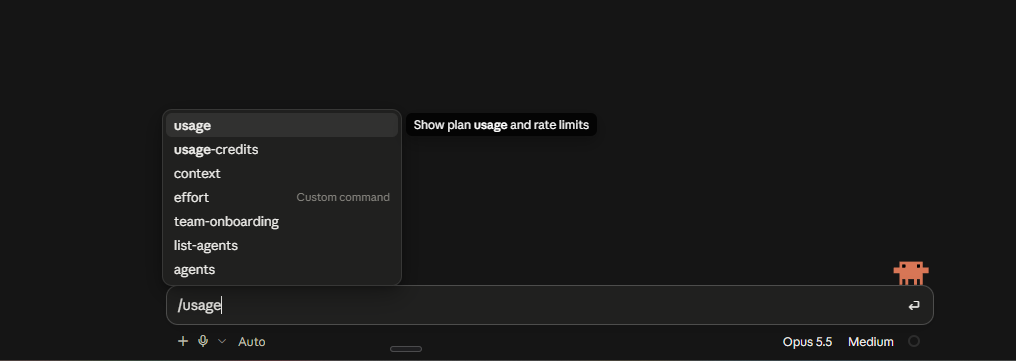
/usageto check the plan allowance and current rate-limit status for that account. - If you need a different account, use
/loginand complete the sign-in flow for that account. If Claude Code is already signed in with the wrong identity, use/logoutfirst, then sign in again. - Run
/statusand/usageonce more to confirm the switch worked.
Anthropic lists /login and /logout as account authentication and switching commands. Type / at an empty prompt to see the commands available in your installation; commands can vary by version or setup.
If you want to switch between a Claude subscription and Claude Console pay-as-you-go access, Anthropic says to use /login and choose the intended authentication option. Confirm the account and billing method before continuing a long task.
Keep personal, team, and client sessions straight
Give each account a practical label in your own notes, such as Personal Pro, Studio Team, or Client – approved seat. Don't rely on a terminal tab name or the project folder to tell you which account is signed in; those do not confirm the active Claude identity.
If your individual Claude account and Team or Enterprise account use the same email, Claude's account menu lets you switch between them. Click your initials in the lower-left corner, choose the account, and check which one has the active check mark. For accounts with different emails, separate browser profiles can keep Claude's web sessions from being mixed up.
When you finish work in a client or organization account, verify the active account before your next personal session. Keep client access to accounts and workspaces you're authorized to use, and don't share sign-in details with other people.
Make sure Claude Code is using the billing method you expect
Claude Code can use a Claude subscription or an Anthropic API key. These are different billing paths. Anthropic notes that if the ANTHROPIC_API_KEY environment variable is set, Claude Code may authenticate with that key instead of using the signed-in subscription. API requests then appear as API usage charges.
If the usage meter does not match what you expected:
- Check
/statusto confirm the active account. - Check
/usagefor the plan's current limit status. - Check whether
ANTHROPIC_API_KEYis set in your shell or environment. - If you intend to use a subscription, sign in with the matching Claude account and make sure your environment isn't selecting an API key instead.
For API billing, check the Claude Console and use /cost for token usage and spend in the current session. /cost does not show the remaining allowance on a Pro, Max, Team, or Enterprise plan.
Remember that usage can be shared across Claude apps
For Pro and Max plans, Claude and Claude Code draw from the same plan limits. Activity in Claude on the web or in the desktop app can affect how much is left for coding, and work in Claude Code can affect the allowance you see in Claude. Team and Enterprise plans have their own plan and organization rules, so check the usage page for the account you selected.
That makes account tracking useful even if you switch accounts only occasionally. Before a long task, note the account, its remaining usage, and the displayed reset time. If you use separate accounts for different work, don't assume the allowance from one account is available on another.
See several Claude Code accounts in one place
The built-in /usage command is useful for the account currently signed in to Claude Code. It doesn't give you a single view of all your separate accounts. If you rotate among personal, team, or client accounts, you still need to switch identities and check each one.
Usage Buddy helps monitor supported Claude Code accounts in one desktop dashboard. Give each account a clear label, then compare its remaining usage and reset time without repeating the sign-in-and-check routine. You can set warning thresholds and get alerts when an account is running low or its allowance is ready again.
Usage Buddy also tracks supported Codex and Cursor accounts. The cross-tool usage guide explains which meters are comparable. It runs on Windows 10/11 (64-bit) and macOS 14 or later, keeps credentials and usage data on your computer, and costs $4.99 once for a lifetime license. If you only use one Claude account, /usage may be all you need. If you switch between several, Usage Buddy saves the repeated checks. For setup, connect a Claude Code account to Usage Buddy.