Claude Code, Codex, and Cursor each have their own usage page, account, and reset schedule. To plan a coding session across all three, check the active account, remaining allowance, and next reset in each provider. Compare the reset times and account rules, not just the percentages: 40% remaining in one tool does not mean the same capacity as 40% in another.
Where to check usage in each tool
| Tool | Manual usage check | What to note |
|---|---|---|
| Claude Code | Claude Settings → Usage, or /usage in Claude Code |
Which plan limits are shown and when they reset |
| Codex | Codex usage dashboard, or /status in Codex CLI |
Active ChatGPT account or workspace, remaining limit, reset time, credits |
| Cursor | Cursor dashboard → Spending | Remaining usage pools, reset date, on-demand usage |
The details vary by plan. Claude usage differs between a Claude subscription and API-key access. Codex uses ChatGPT plan usage when you sign in with ChatGPT, while an API key uses OpenAI Platform billing. Cursor's dashboard can show separate usage pools and on-demand charges. For step-by-step instructions, see our guides to checking Claude Code usage, checking Codex usage, and checking Cursor usage.
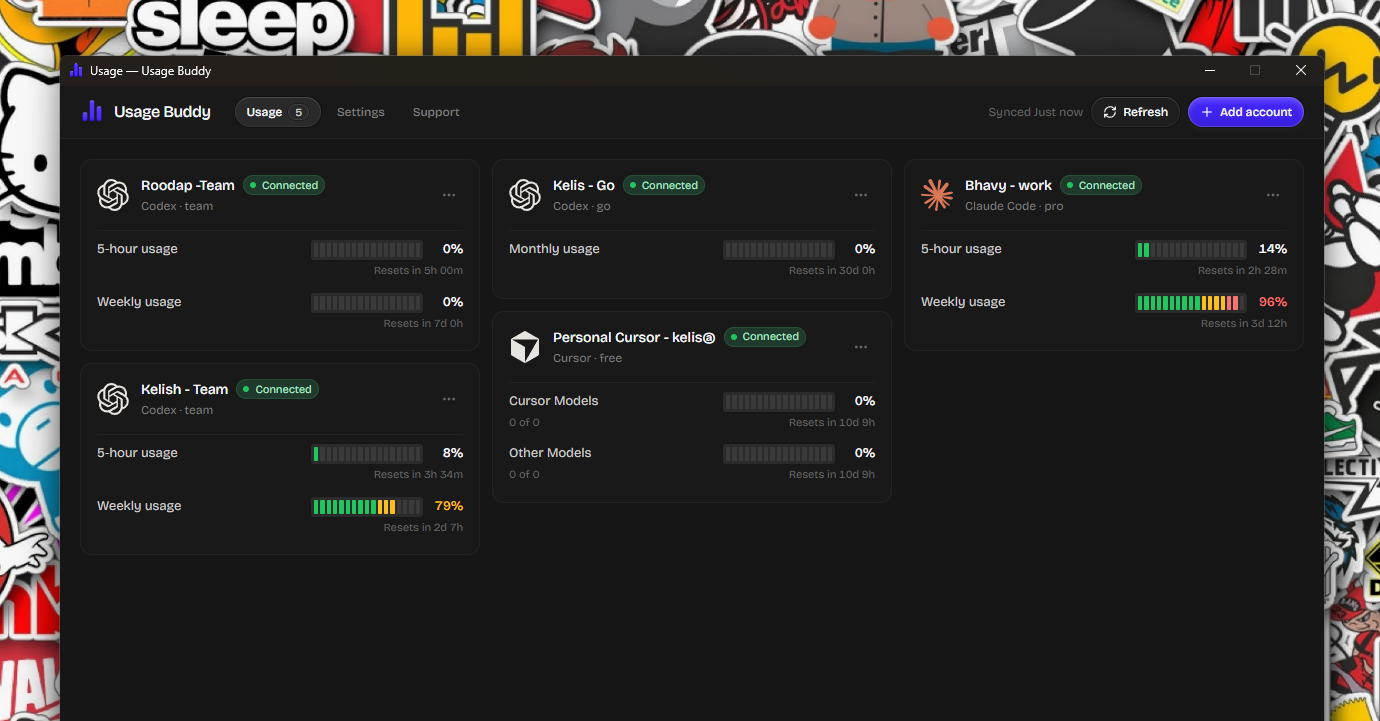
Why the percentages don't line up
Each provider measures a different allowance. Claude may show several plan windows, Codex can display account limits and credits, and Cursor can separate included usage into pools. Their reset clocks differ too. A monthly Cursor reset, for example, is not directly comparable with a shorter usage window in another service.
Treat percentages as provider-specific indicators. Use a reading like “Codex: 30% left” to understand that Codex account's meter, not to estimate how many coding tasks it can handle compared with Claude or Cursor. Task size, model choice, context, tools, and where the task runs can all affect consumption.
A simple routine before a long coding task
- Confirm the project account first. Check whether the repository belongs to you, your team, or a client. Use only the account and workspace approved for that work.
- Check the active identity. A browser tab, desktop app, and CLI can be signed in differently. Confirm the account or workspace in the tool you are about to use.
- Read usage and reset together. A smaller allowance that resets soon may be more useful for a short task than a larger allowance that will not refresh for days. Consider the actual task, not just the number.
- Check billing separately. If API keys or on-demand usage are enabled, the usage meter may not be the whole cost picture. Confirm the provider's billing page and spending controls before a long run.
- Save a short handoff before changing tools. The next coding assistant will not automatically inherit the current tool's full conversation. Note the goal, changed files, checks already run, and the next step.
For Codex, codex login status shows the current authentication method. The usage dashboard and /status show usage information for a ChatGPT sign-in; an API-key login follows API pricing instead. Check the OpenAI authentication guide if you are unsure which billing path Codex is using.
Keep the manual comparison lightweight
If you use only one provider, its usage page is usually enough. With several tools or accounts, keep a small table so you can compare the information that helps you plan:
| Account label | Remaining allowance | Next reset | Billing note |
|---|---|---|---|
| Personal Claude | Read Claude's own meter | Displayed reset | Subscription or API |
| Team Codex | Read the selected workspace meter | Displayed reset | Credits or workspace billing |
| Cursor for project X | Check each displayed pool | Billing-cycle date | On-demand enabled or off |
Don't copy percentages from one day into a spreadsheet and assume they tell the whole story. Refresh before a demanding task, and use the provider dashboard to investigate a number that looks wrong. If you switch accounts, verify the active login before recording each reading.
Check multiple providers in one dashboard
If you repeat the same checks across several accounts, Usage Buddy puts supported Claude Code, Codex, and Cursor accounts in one desktop dashboard. Label accounts, review remaining usage and reset times together, and set warning thresholds so you get an alert when usage is running low or an allowance becomes available again.
Usage Buddy is for monitoring account allowances and reset times; it does not turn Claude, Codex, and Cursor percentages into a shared unit or replace each provider's billing page. Credentials and usage data stay on the computer. It supports Windows 10/11 (64-bit) and macOS 14 or later, with a $4.99 one-time lifetime license.